•Default Size
Defines the Resolution to bake at.
You can create non-uniform resolutions by unlinking the two dropdowns (=), however please note that Mari on Import will square the image again,
with the highest value in width/height being the new resolution (e.g. 512x1024 will turn into 1024x1024)
•Default Anti Aliasing
Defines the amount of Anti Aliasing to apply to your Bake.
Enabling Anti Aliasing can significantly increase baking time, as Anti Aliasing works by computing a texture at a higher resolution and then
downscaling it back to the originally selected size.
It is sometimes preferable to increase the number of rays in the baker rather then the Anti Aliasing. It could achieve better results with lower baking times.
•Default Channel Creation
Defines how the result of a Bake should be imported into Mari
oGeo Channel - A channel that lives on the Object and can be called via the Geo Channel Node
oChannel - A standard Mari Channel that is visible in the Channel Palette
|
|
Geo Channels are only available in Mari 4.6 or higher
|
•Default Average Normals
Defines if a newly created Baker should perform Normal Averaging on the models. Normal Averaging can give a seemingly smoother result and reduce facetting.
•Default UDIM Range
The Default Range of Patches a newly created Baker should bake


Patch Lists in this Textfield can be defined by
oComma (,) separating invididual patches e.g. 1001,1003,1008
oDash(-) separating Patch Ranges e.g 100-1005,1007,1009-1020
oStar (*) to use the full available Patch Range
•UDIM Range Quick Select
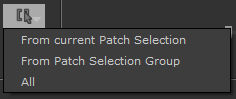
Quick Selection Methods can be accessed via the Button next to the UDIM Range Field.
oFrom current Patch Selection
Will sample the Patch Selection on the currently active Mari Object and fill the Text field accordingly
oFrom Patch Selection Group
Will open a selection dialog, letting you choose a predefined Selection Group from the Mari Selection Group Palette.
oAll
Will set the Text Field to ' * (All)', so all UDIMs will be baked.


