|
Where does Mari store its User Settings ? |
Mari stores a lot of settings in a configuration file.
Sometimes part of this configuration file can become corrupted leading to all sorts of odd behaviors inside Mari.
Often times when experiencing unexplainable issues, it can be a good idea to test with a fresh config file.
To do that go to:
•Win: \user\username\.mari\TheFoundry
•Linux: ~/.config/TheFoundry (~ refers to your home directory)
•Mac: ~/.config/TheFoundry (~ refers to your home directory)
In there you will find a file called
oMariVERSION.conf (linux/mac)
oMariVERSION.ini (windows)
e.g. for Mari 4.6 v 1
▪ Mari4.6v1.conf (linux/mac)
▪ Mari4.6v1.ini (windows)
Rename that file and restart Mari to start with a fresh configuration file.
Click NO is you are asked to import any previous configs in order to have a truly fresh start.(edited)
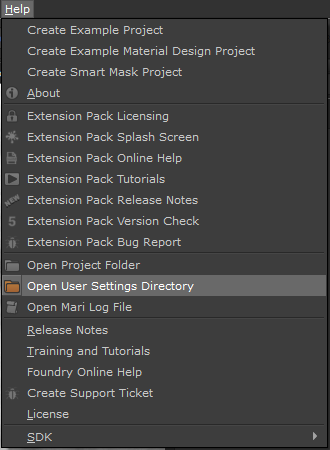
You can directly access your User Settings Folder via the Help Menu