Access & Configuration of the Substance Bridge


Where to find it:


Main Window / Project Toolbar


Main Window / Extension Pack / Baker


Shortcut: (unassigned, use "Edit / Shortcuts" to assign)


The Substance Baker Bridge will automatically look for a either a Substance Automation Toolkit or Substance Designer (12.1+)Distribution in common installation locations.


Alternatively it will check for the existence of the Substance Environment Variable SAT_INSTALL_PATH, which can be used to declare

the Installation Folder e.g. in a Studio Environment.


If an Installation is found through any of those two ways your Substance Baker Bridge will start fully configured.



If the Substance Baker Bridge was unable to automatically detect either

Substance Automation Toolkit

Substance Designer (12.1 or higher)

Currently no Support for Substance Designer 15
The Substance Baker Bridge currently does not support Adobe's latest Substance Designer 15.x (July 2025) release which introduced major changes to the baking system. Extension Pack aims to restore compatibility via a 6R3.v2 patch in the coming months.
If you have older versions of Designer available you can point to them via the SAT_INSTALL_PATH Environment Variable which the Substance Baker Bridge will use.


a dialog will prompt you to specify the Installation Folder of one of them


The Path to your ...


Substance Automation Toolkit

or

Substance Designer (12.1 or higher)


... can be changed at any time within the main Substance Baker Bridge Dialog, in the Tool Configuration Settings.


If available, Substance Baker Bridge will automatically get the Substance Installation Folder from the Environment Variable


SAT_INSTALL_PATH


The Environment Variable can be pointed to the Folder where your Toolkit is installed.


 This is a Substance3D Environment Variable, not an Extension Pack one.


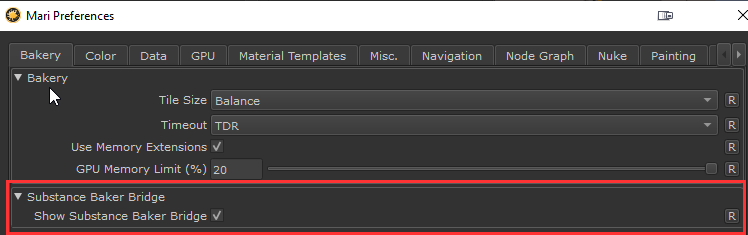
From Mari 7.0 on wards, Mari has its own Baker called "The Bakery". If you wish to exclusively use the Bakery, you may want to hide the Substance Baker Bridge button in the toolbar.
You can do this by turning off the preference in the Edit/Preferences/Bakery Menu


<=  Substance Baker Bridge                                                                                                  => Baker Types