
Defining custom Node Context Menus |
 Registering Node Context Menus
You can define your own Context Menus and register them to appear on certain node types. You will use the Hotbox Manager to author the menu and some simple python commands to register them to a node. We will guide you through the process below
Authoring Node Context Menus |
To create Node Context Menus you can use the Extension Pack Hotbox Manager. Author the menu just like any other Hotbox, defining buttons, sliders, assigning functions via actions or python scripts etc.
|
|
It is recommended to create row based hotboxes ("Hotkbox Type: Row Based") for the context menus, instead of radial or circular ones |
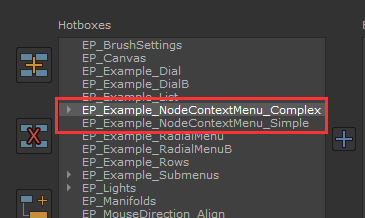
The Hotbox Manager comes with two example Hotboxes for Context Menus - "EP_Example_NodeContextMenu_Simple" and "EP_Example_NodeContextMenu_Complex"
Once you are happy with the look and functionality of your hotbox, ensure the "Is Context Menu" option is ticked on.
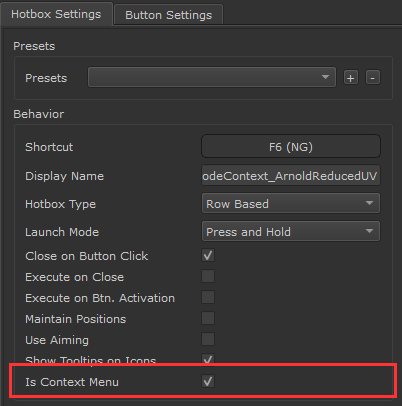
This will activate various features on the hotbox menu relevant to context menus:
•The size of the Hotbox will be tied to the Nodegraph Zoom Factor
•The Hotbox will always appear over the selected Node
•A close button will be added and a "back" button for submenus
|
|
When a Context Menu, the Bounding Box of the Hotbox will be dynamically calculated based on Node Size and Nodegraph Zoom factor. This can lead to small look differences compared to the preview in the Hotbox Manager (e.g. Font Spacing, Button Positions might slightly shift etc.) |
|
Registering Node Context Menus to Nodes |
You will want to decide where you want to store your Node Context Menus.
By default the Hotbox Manager will store authored Hotboxes under
oWINDOWS: C:\Users\USERNAME\.mari\TheFoundry\Hotboxes
oLINUX: HOMEFOLDER/.config/TheFoundry/Hotboxes
You can access the location by
1.Clicking the "Location" Button in the Hotbox Manager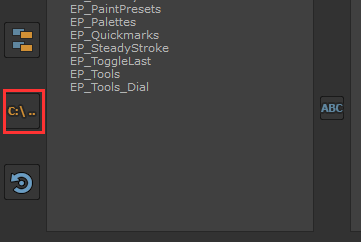
2.Or going via the Help Menu "Open User Settings Directory" and choosing the "Hotbox" Folder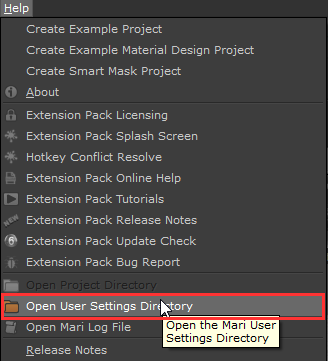
•If you want to move your Node Context Menu to a different location, locate the Subfolder of the "Hotbox" Folder that is named as your Hotbox and copy/move it to a new location
•If you want to keep the Node Context Menu alongside regular Hotboxes, that will also work and you don't have to do anything
Copy the full path to the Hotbox Folder. For example if your Hotbox is called "My Node Context Menu" and you are on windows it would look like this
C:\Users\USERNAME\.mari\TheFoundry\Hotboxes\My Node Context Menu
|
|
Forward Slashes only in Paths
Right : C:/Users\USERNAME/.mari/TheFoundry/Hotboxes/My Node Context Menu |
In the last step you ended up with a path to a authored hotbox that was marked as a Node Context Menu. You have the location/path where the Hotbox is stored and have converted the path to use forward slashes.
Now it's time to register that Hotbox to the Node Type you want it to appear on when pressing CTRL+ SPACE.
Registration is done via a python command
•mari.ep.nodeUtilities.registerNodeContextMenu(NODETYPE,PATH_TO_HOTBOX_FOLDER,OPTIONAL_CLASS)
The command has three arguments:
1.NODETYPE
determines what Node the Context Menu is registered to. There are various ways to determine this.
Please refer to the "Register by .." Sections further below on this page, where we will cover this in Detail.
The Node Type needs to be placed between " " denoting it as a so called "string"
2.PATH_TO_HOTBOX
is the path you previously copied from the location where the hotbox is saved.
The Path needs to be placed between " " denoting it as a so called "string
3.OPTIONAL_CLASS
In most cases you specify here "None" (without " "). This is only relevant if you need to register a context Menu to a specific Node Class.
Below is a fictional example of registering a context menu to a "Merge" Node:
•mari.ep.nodeUtilities.registerNodeContextMenu("MRI_Layer_Merge_v2",/myPath/HotboxFolder", None)
|
|
A full example can be found inside the Mari Extension Pack Install Folder / Resources / PythonExamples |
You usually want to auto register your Node Context Menu(s) on Mari start. To do this, we will create a python file inside Mari's Script Directory.
Mari's Script Directory is auto sourced on Mari Start for Python files.
Locate your Mari Scripts Directory
Your Mari Scripts directory is often the same location where you installed Mari Extension Pack to. If you are unsure where that is, open Mari's Python console by pressing CTRL+ALT+P.
Paste the following into your console :
mari.resources.path(mari.resources.USER_SCRIPTS)
Then press CTRL+ENTER to evaluate the code or press the "play" button in the Python console.
You should get a print out in your console with all locations mari scans for user scripts. In the below example we have two eligible locations (separated by ;)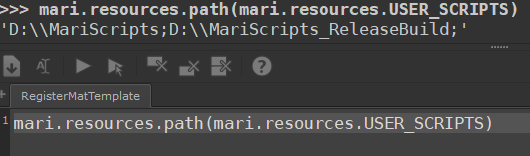
Create a .py file
Go to a location scanned by Mari and create an empty file for example named "registerNodeContextMenus.py".
Open the file with a text editor. It's usually best to use simple editors, as for example tools like wordpad are unsuited for writing script files since they add additional characters and formatting.
Start your file with
import mari
then add as many lines as you need to register different node context menus using the previously explained command e.g.
import mari
mari.ep.nodeUtilities.registerNodeContextMenu("MRI_Layer_Merge_v2",/myPath/MergeContextMenu", None)
mari.ep.nodeUtilities.registerNodeContextMenu("JK_IOR2SpecLevel",/myPath/SpecLevelContextMenu", None)
Avoiding Conflicts with already registered Context Menus
Extension Pack registers already a number of Context Menus. If you want to overwrite one with your own you need to either
•ensure your python file gets run after Extension Pack was initialized ... usually you achieve this by making sure your filename is alphabetically after Extension Pack's initialization file (__initExtensionPack__) in your file browser
•alternatively and more safe, you can de-register already registered Context Menus
Deregistering a Context Menu
In the below example we assume you want to register to the Merge Node, which Extension Pack already registers a Menu for. You can use a so called try/except to "shoot into the dark". Even if no Context Menu has been previously registered to the node, this way the script will still run correctly
import mari
try:
mari.ep.nodeUtilities.deregisterNodeContextMenu("MRI_Layer_Merge_v2")
except:
pass
mari.ep.nodeUtilities.registerNodeContextMenu("MRI_Layer_Merge_v2",/myPath/MergeContextMenu", None)
|
|
Python is sensitive to spaces/indents. In the above example the lines after "try" and "except" are indented by 4 spaces / 1 tabstop |
Printing out all registered Context Menus
If you wish to see all Context Menus that are currently registered in Mari, go to your Python Console and execute the following code. Again please be aware of the indentation of the "print(menu)" (4 spaces)
menus = mari.ep.nodeUtilities.getRegisteredNodeContextMenus()
for menu in menus:
print(menu)
|
Register by ... |
Now that you know the basics, you will want to find out exactly how to find the node type you need to register a menu to. There are a number of options available:
By far the most common method is to register to a specific node type via the so called "Type ID" of the Node.
To retrieve a Node's Type ID select the Node and right mouse click on it. From the "Edit" Submenu choose the "Info Viewer" Option.
Near the top you will find a line starting with "Version UUID". Copy the ID after it by highlighting the text and pressing CTRL+C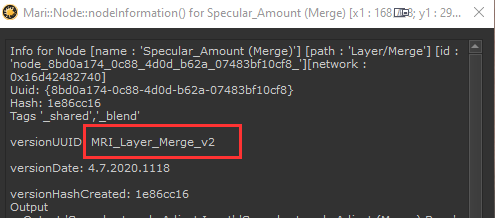
Paste the ID into your registration Command, making sure it is between the " "
•mari.ep.nodeUtilities.registerNodeContextMenu("MRI_Layer_Merge_v2",/myPath/MergeContextMenu", None)
|
|
Not all Nodes have Type IDs defined ! You may have to use other methods to identify a node if the VersionUUID is empty |
In the previous example we registered a Node Context Menu to the type ID of a node e.g. "MRI_Layer_Merge_v2"
As you can see this particular Node Type ID contains a version number (v2). If the node would be upversioned at any point (for example if new features are added to it), it would most likely be called "MRI_Layer_Merge_v3".
At this point your node context menu registration would stop working for the node, as it explicitly registers the Menu to v2.
You can prevent this from happening by registering the Context Menu only to a partial ID:
mari.ep.nodeUtilities.registerNodeContextMenu("MRI_Layer_Merge_",/myPath/MergeContextMenu", None)
As long as no other Context Menu registration matches to MRI_Layer_Merge_v2, MRI_Layer_Merge_ would match as well. Partial matches are determined based on matching beginnings of the Type ID.
For example you could register a context menu to all standard Mari nodes by registering it to "MRI_"
mari.ep.nodeUtilities.registerNodeContextMenu("MRI_",/myPath/MergeContextMenu", None)
Extension Pack defines some hardcoded tags to to register against node types that are otherwise hard to determine because of duplicated or missing Node Type IDs.
The following tags are defined
•_shader
•_material
•_group
•_channel
•_bakepoint
•_multiChannelMerge
For example to register a node context menu to any Shader Node in the Nodegraph you could use
•mari.ep.nodeUtilities.registerNodeContextMenu("_shader",/myPath/ShaderContextMenu", None)
Some Node types can only be reliably identified by their Mari internal "class name". An example of this are Multi Channel Bake Points.
You can find the unique class name of a node by either
•Consulting Mari's Python API Help under Python Menu / Documentation / Mari Python Documentation
•Or by printing it out via the Python console using the code below. Select the node you wish to query and execute the following:
node = mari.ep.node.current()
print(node)
For a Multi Channel Bake Point the print out would look like this ...
<mari.MultiChannelBakePointNode(0x16cd44373c0) at 0x0000016CCBE49640>
... so its class name would be "mari.MultiChannelBakePointNode"
To register a context menu to the class paste the full class name into the first argument (between the " ") and into the last argument (without " ")
•mari.ep.nodeUtilities.registerNodeContextMenu("mari.MultiChannelBakePointNode",/myPath/MCBPContextMenu", mari.MultiChannelBakePointNode)
In addition to registering to specific node types, you can also make a Context Menu dependent on the existence of certain Metadata Names on a Node.
This can be useful if you you want to for example target a menu to any node that has an Attribute called "UVRepeat" or similar.
You can indentify metadata names on a node by executing the code below with a node selected (again be aware of the proper 4 space indentation of the print() )
node = mari.ep.node.current()
for name in node.metadataNames():
print(name)
To register a context menu to a metadata name, you need to prefix it with "$". In the below example we are registering a menu to the Metadata "UVRepeat":
•mari.ep.nodeUtilities.registerNodeContextMenu("$UVRepeat",/myPath/CustomContextMenu", None)
If the above "By Metadata Name" method is not sufficient, you can also register by specific Entries of the Metadata, if its value is a python dictionary
In the below example we register a node context menu to any node that:
ohas the Metadata "EP_MaterialTemplate"
othe metadata contains a dictionary (indicated by the { })
othe dictionary contains a key "Name"
othe value of the Dictionary key "Name" is "BRDF UV"
•mari.ep.nodeUtilities.registerNodeContextMenu("$EP_MaterialTemplate{Name:BRDF UV}",/myPath/CustomContextMenu", None)
When deciding which node context menu to display the following order is maintained (top to bottom, first match is shown):
1.By Metadata Name
2.By Metadata Dictionary Value
3.By Tag
4.By Class
5.By complete Type ID
6.By partial Type ID
|
|
The _group tag is an exception and is evaluated last, after everything else |
The following standard Extension Pack Node Context Menus are currently registered. The Node Context Menus that ship with Extension Pack are in the Extension Pack Installations / Tools / ContextMenus:
Tags
•("_bakepoint","$EPRESOURCES/NodeContext_BakePoint", None)
•("_shader","$EPRESOURCES/NodeContext_Shader", None)
•("_channel","$EPRESOURCES/NodeContext_Channel", None)
•("_group","$EPRESOURCES/NodeContext_Groups", None)
•("_multiChannelMerge","$EPRESOURCES/NodeContext_MultiChannelMerge", None)
Classes
•("mari.BroadcastTeleportNode","$EPRESOURCES/NodeContext_Broadcast", mari.BroadcastTeleportNode)
•("mari.ReceiverTeleportNode","$EPRESOURCES/NodeContext_Receiver", mari.ReceiverTeleportNode)
•("mari.GeoChannelNode","$EPRESOURCES/NodeContext_GeoChannel", mari.GeoChannelNode)
•("mari.PaintNode","$EPRESOURCES/NodeContext_PaintNode", mari.PaintNode)
•("mari.MultiChannelBakePointNode","$EPRESOURCES/NodeContext_MCBP", mari.MultiChannelBakePointNode)
Node IDs
•("MRI_Environment_Tri_Planar_Projection" ,"$EPRESOURCES/NodeContext_AxisProjection", None)
•("JK_Axis_Projection","$EPRESOURCES/NodeContext_AxisProjection", None)
•("JK_Manifold3D","$EPRESOURCES/NodeContext_Manifold3d", None)
•("JK_ManifoldUV","$EPRESOURCES/NodeContext_ManifoldUV", None)
•("MRI_Procedural_Pattern_Tiled_v2","$EPRESOURCES/NodeContext_Tiled", None)
•("JK_TiledExtended","$EPRESOURCES/NodeContext_TiledExtended", None)
•("JK_ABCompareMask","$EPRESOURCES/NodeContext_ABCompare", None)
•("JK_HeightBlend","$EPRESOURCES/NodeContext_HeightBlend", None)
•("JK_RadioNodeTransmitter","$EPRESOURCES/NodeContext_Transmitter", None)
•("JK_RadioNode","$EPRESOURCES/NodeContext_Radio", None)
•("MRI_Layer_Merge_v2","$EPRESOURCES/NodeContext_Merge", None)
•("JK_Blend_","$EPRESOURCES/NodeContext_Merge", None)
•("MRI_Procedural_Cloud_v2","$EPRESOURCES/NodeContext_Cloud", None)
•("Legacy Cloud V2","$EPRESOURCES/NodeContext_Cloud", None)
•("MRI_Filter_Brightness_Lookup","$EPRESOURCES/NodeContext_Curves", None)
•("JK_BrightnessLookupMasked","$EPRESOURCES/NodeContext_Curves", None)
•("JK_ColorLookupMasked","$EPRESOURCES/NodeContext_Curves", None)
•("MRI_Filter_Color_Lookup","$EPRESOURCES/NodeContext_Curves", None)
•("JK_RGBALookupMasked","$EPRESOURCES/NodeContext_Curves", None)
•("JK_DirectionalGradient","$EPRESOURCES/NodeContext_DirectionalGradient", None)
•("MRI_Procedural_Projection_Projection","$EPRESOURCES/NodeContext_Projection", None)
Material Templates
•("$EP_MaterialTemplate{Name:Arnold Reduced UV}","$EPRESOURCES/NodeContext_MaterialTemplateUV_GenRough", None)
•("$EP_MaterialTemplate{Name:Arnold Complex UV}","$EPRESOURCES/NodeContext_MaterialTemplateUV_GenRough", None)
•("$EP_MaterialTemplate{Name:UnrealAdv UV}","$EPRESOURCES/NodeContext_MaterialTemplateUV_GenRough", None)
•("$EP_MaterialTemplate{Name:3Delight UV}","$EPRESOURCES/NodeContext_MaterialTemplateUV_GenRough", None)
•("$EP_MaterialTemplate{Name:Principled UV}","$EPRESOURCES/NodeContext_MaterialTemplateUV_GenRough", None)
•("$EP_MaterialTemplate{Name:pxrSurface Artistic Complex UV}","$EPRESOURCES/NodeContext_MaterialTemplateUV_Pxr", None)
•("$EP_MaterialTemplate{Name:pxrSurface Artistic Reduced UV}","$EPRESOURCES/NodeContext_MaterialTemplateUV_Pxr", None)
•("$EP_MaterialTemplate{Name:pxrSurface Pysical Complex UV}","$EPRESOURCES/NodeContext_MaterialTemplateUV_Pxr", None)
•("$EP_MaterialTemplate{Name:pxrSurface Pysical Reduced UV}","$EPRESOURCES/NodeContext_MaterialTemplateUV_Pxr", None)
•("$EP_MaterialTemplate{Name:BRDF UV}","$EPRESOURCES/NodeContext_MaterialTemplateUV_GenGloss", None)
•("$EP_MaterialTemplate{Name:Vray Complex UV}","$EPRESOURCES/NodeContext_MaterialTemplateUV_GenGloss", None)
•("$EP_MaterialTemplate{Name:Vray Reduced UV}","$EPRESOURCES/NodeContext_MaterialTemplateUV_GenGloss", None)
•("$EP_MaterialTemplate{Name:Arnold Reduced 3D}","$EPRESOURCES/NodeContext_MaterialTemplate3D_GenRough", None)
•("$EP_MaterialTemplate{Name:Arnold Complex 3D}","$EPRESOURCES/NodeContext_MaterialTemplate3D_GenRough", None)
•("$EP_MaterialTemplate{Name:UnrealAdv 3D}","$EPRESOURCES/NodeContext_MaterialTemplate3D_GenRough", None)
•("$EP_MaterialTemplate{Name:3Delight 3D}","$EPRESOURCES/NodeContext_MaterialTemplate3D_GenRough", None)
•("$EP_MaterialTemplate{Name:Principled 3D}","$EPRESOURCES/NodeContext_MaterialTemplate3D_GenRough", None)
•("$EP_MaterialTemplate{Name:pxrSurface Artistic Complex 3D}","$EPRESOURCES/NodeContext_MaterialTemplate3D_Pxr", None)
•("$EP_MaterialTemplate{Name:pxrSurface Artistic Reduced 3D}","$EPRESOURCES/NodeContext_MaterialTemplate3D_Pxr", None)
•("$EP_MaterialTemplate{Name:pxrSurface Pysical Complex 3D}","$EPRESOURCES/NodeContext_MaterialTemplate3D_Pxr", None)
•("$EP_MaterialTemplate{Name:pxrSurface Pysical Reduced 3D}","$EPRESOURCES/NodeContext_MaterialTemplate3D_Pxr", None)
•("$EP_MaterialTemplate{Name:BRDF 3D}","$EPRESOURCES/NodeContext_MaterialTemplate3D_GenGloss", None)
•("$EP_MaterialTemplate{Name:Vray Complex 3D}","$EPRESOURCES/NodeContext_MaterialTemplate3D_GenGloss", None)
•("$EP_MaterialTemplate{Name:Vray Reduced 3D}","$EPRESOURCES/NodeContext_MaterialTemplate3D_GenGloss", None)
•("$EP_MaterialTemplate{Name:Arnold Reduced Decal}","$EPRESOURCES/NodeContext_MaterialTemplateProject_GenRough", None)
•("$EP_MaterialTemplate{Name:Arnold Complex Decal}","$EPRESOURCES/NodeContext_MaterialTemplateProject_GenRough", None)
•("$EP_MaterialTemplate{Name:UnrealAdv Decal}","$EPRESOURCES/NodeContext_MaterialTemplateProject_GenRough",None)
•("$EP_MaterialTemplate{Name:3Delight Decal}","$EPRESOURCES/NodeContext_MaterialTemplateProject_GenRough", None)
•("$EP_MaterialTemplate{Name:Principled Decal}","$EPRESOURCES/NodeContext_MaterialTemplateProject_GenRough", None)
•("$EP_MaterialTemplate{Name:pxrSurface Artistic Complex Decal}","$EPRESOURCES/NodeContext_MaterialTemplateProject_Pxr,None)
•("$EP_MaterialTemplate{Name:pxrSurface Artistic Reduced Decal}","$EPRESOURCES/NodeContext_MaterialTemplateProject_Pxr,None)
•("$EP_MaterialTemplate{Name:pxrSurface Pysical Complex Decal}","$EPRESOURCES/NodeContext_MaterialTemplateProject_Pxr,None)
•("$EP_MaterialTemplate{Name:pxrSurface Pysical Reduced Decal}","$EPRESOURCES/NodeContext_MaterialTemplateProject_Pxr,None)
•("$EP_MaterialTemplate{Name:BRDF Decal}","$EPRESOURCES/NodeContext_MaterialTemplateProject_GenGloss", None)
•("$EP_MaterialTemplate{Name:Vray Complex Decal}","$EPRESOURCES/NodeContext_MaterialTemplateProject_GenGloss",None)
•("$EP_MaterialTemplate{Name:Vray Reduced Decal}","$EPRESOURCES/NodeContext_MaterialTemplateProject_GenGloss",None)
•("$EP_MaterialTemplate{Name:Arnold Reduced Scatter Triplanar}","$EPRESOURCES/NodeContext_MaterialTemplateScatter_GenRough",None)
•("$EP_MaterialTemplate{Name:Arnold Complex Scatter Triplanar}","$EPRESOURCES/NodeContext_MaterialTemplateScatter_GenRough)
•("$EP_MaterialTemplate{Name:UnrealAdv Scatter Triplanar}","$EPRESOURCES/NodeContext_MaterialTemplateScatter_GenRough,None)
•("$EP_MaterialTemplate{Name:3Delight Scatter Triplanar}","$EPRESOURCES/NodeContext_MaterialTemplateScatter_GenRough", None)
•("$EP_MaterialTemplate{Name:Principled Scatter Triplanar}","$EPRESOURCES/NodeContext_MaterialTemplateScatter_GenRough,None)
•("$EP_MaterialTemplate{Name:pxrSurface Artistic Complex Scatter Triplanar}","$EPRESOURCES/NodeContext_MaterialTemplateScatter_Pxr",None)
•("$EP_MaterialTemplate{Name:pxrSurface Artistic Reduced Scatter Triplanar}", "$EPRESOURCES/NodeContext_MaterialTemplateScatter_Pxr",None)
•("$EP_MaterialTemplate{Name:pxrSurface Pysical Complex Scatter Triplanar}","$EPRESOURCES/NodeContext_MaterialTemplateScatter_Pxr",None)
•("$EP_MaterialTemplate{Name:pxrSurface Pysical Reduced Scatter Triplanar}","$EPRESOURCES/NodeContext_MaterialTemplateScatter_Pxr",None)
•("$EP_MaterialTemplate{Name:BRDF Scatter Triplanar}","$EPRESOURCES/NodeContext_MaterialTemplateScatter_GenGloss", None)
•("$EP_MaterialTemplate{Name:Vray Complex Scatter Triplanar}","$EPRESOURCES/NodeContext_MaterialTemplateScatter_GenGloss",None)
•("$EP_MaterialTemplate{Name:Vray Reduced Scatter Triplanar}","$EPRESOURCES/NodeContext_MaterialTemplateScatter_GenGloss",None)