|
MODO Bake Presets |
 Where to find it:
 Main Window / Modo Render Palette / Modo Bake Tab

MODO Bake Presets are additional Bake recipes for Mari's internal MODO BAKE System that you can access via the MODO Render Palette / 'Bake' Tab..
The following presets are currently included with Extension Pack:
The Curvature Stacked Preset will create a RGB Curvature Map with each color channel including different information.
Options for Convex, Concave and 'Highpass' are adjusted separately.
|
|
The Highpass Blue Channel can have different Convex and Concave Settings than what is used for the Red and Green channel |
 RED CHANNEL = Convex Features
GREEN CHANNEL = Concave Features
BLUE CHANNEL = 'Highpass' - Black concave, Grey Neutral, White Convex

The Curvature Highpass Preset will create a Curvature Map separating Concave and Convex Edges.
Options for Concave and Convex are adjusted separately.
 BLACK = Concave Features
GREY = Neutral
WHITE = Convex Features

The Rainbow AO Preset will create a RGB Ambient Occlusion with different Ambient Occlusion Calculations per Color Channel
RED CHANNEL = Uniform Occlusion
GREEN CHANNEL = World Down Occlusion
BLUE CHANNEL = World Up Occlusion

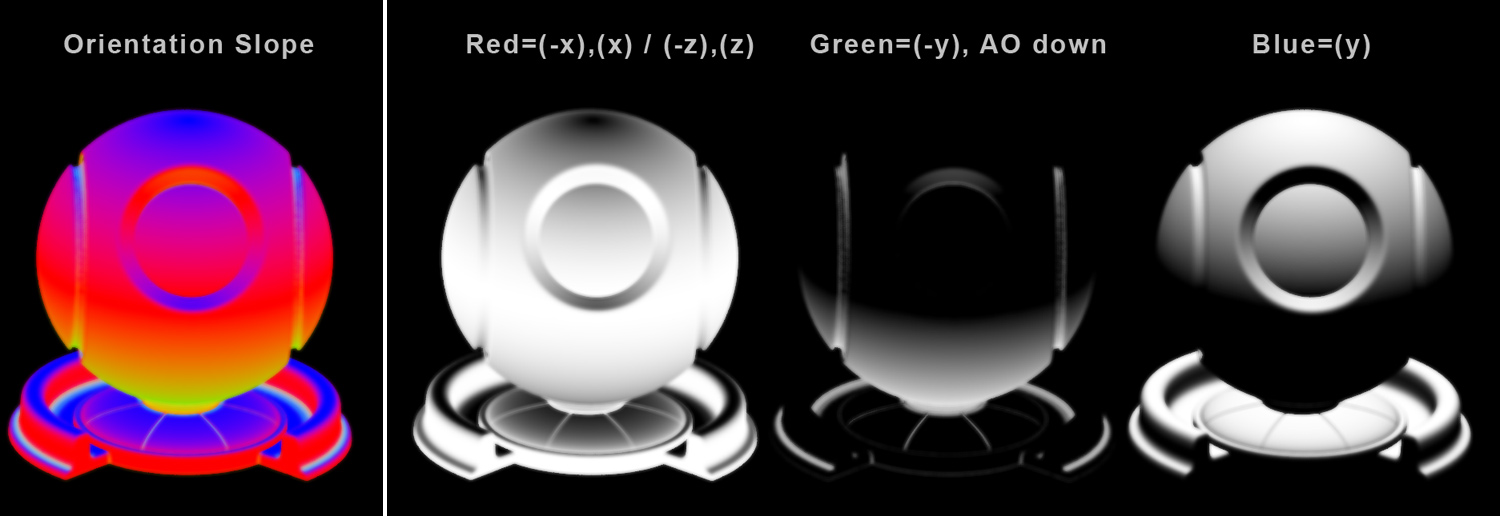
The Orientation Slope Preset will create a mixture of object space direction and occlusion maps, separating them into different Color Channels.
RED CHANNEL = (X) / (- X) / (Z) / (-Z)
GREEN CHANNEL = World Down Occlusion & (-Y)
BLUE CHANNEL = (Y)