
|
MultiMixer (X4 / X8) by Jens Kafitz |
 Where to find it: (This Node is available in the Nodegraph only)

 NodeGraph / Right Mouse Click / Add Nodes / Layer / Extension Pack /


The MultiMixer Nodes allows you to layer multiple node streams.
The MultiMixer Nodes come in two variations. One with 4 Input slots (X4) and one with 8 Input Slots (X8).
Apart from the available Inputs they work the same way.
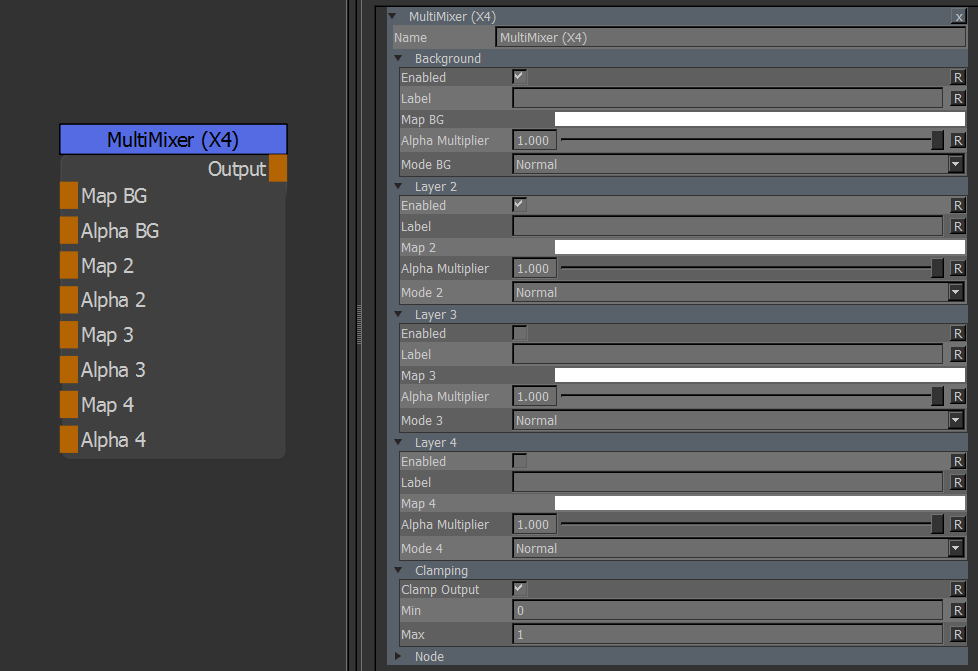
•Map BG / 2 / 3 /4 / 5 / 6 / 7 / 8
When mapped the corresponding Color field in the Node is no longer used and the Node Connection is used
instead.
MultiMixer (X8) has 8 map slots, while the MultiMixer (X4) only has 4.
•Alpha BG / 2 / 3 / 4 / 5 / 6 / 7 / 8
Supplies an Alpha/Mask to each Map slot.
MultiMixer (X8) has 8 alpha slots, while the MultiMixer (X4) only has 4.
MAIN TAB
•Enabled
The slot will only be evaluated if it is enabled
•Label
Allows the user to add a description to the layer slot
•Map
Allows you to choose a color for the slot.
If the corresponding node connection is mapped the color field will no longer be evaluated.
•Alpha Multiplier
Acts as the Opacity value for the Layer Slot.
If a node connection for an alpha is mapped the Alpha Multiplier will multiply against that input
•Blend Mode
The Blend Mode how to overlay the Layer over the previous one
•Clamp Output
When checked, the result of the Node will be clamped to the values below
•Min
The lowest value the node is allowed to output when Clamp Output is checked
•Max
The highest value the node is allowed to output when Clamp Output is checked