Released by Jens Kafitz, 2026 - www.MariExtensionPack.org   | Join us on ,or


Download Online Help


RELEASED ON:   March 8, 2026


MINIMUM REQUIREMENT (for Mari 6.x):  MARI 6.0v1

MINIMUM REQUIREMENT (for Mari 7.x):  MARI 7.0v1


TESTED ON:  Windows 10, Windows 11, Alma Linux 9 (for Mari 7)


Mari 4.x and 5.x are supported by older Extension Pack versions (5R9) which are included in your purchase


Mari Non-Commercial  is not supported due to restrictions by the Foundry


Introduction

Feature Improvements

Bugfixes

API Updates

Deployment Updates


WELCOME TO EXTENSION PACK 6 R4


Mari Extension Pack 6 R4 is a minor feature release, and is a free update for existing Extension Pack 6 customers


Mari Extension Pack 6 will be the last version having officially been tested and supported on Linux CentOS 7. 
CentOS 7 reached end of life on June 30, 2024. In Line with Foundry's policy we will be primarily supporting Mari on Linux Rocky 9+

Mari Extension Pack 6 R4 will be the last version adhering to VFX Ref Platform 2023. Future Versions will exclusively run in Mari Versions supporting PySide6 (Mari 8 and higher)


FEATURE IMPROVEMENTS

Click on a feature for more information


The Substance Baker Bridge now supports the new "Adobe Substance Baker" architecture introduced in Substance Designer and Substance Automation Toolkit 15. 
Support for previous versions using "SBSBaker" remains unchanged.

When using Substance Baker 15.x or higher, you will see several changes in the Substance Baker Bridge, compared to when using previous Substance Versions:

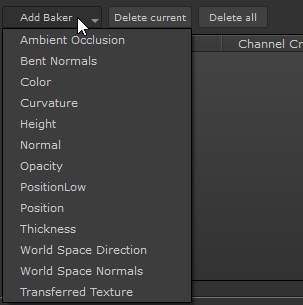
The Legacy Bakers "Ambient Occlusion" and "Curvature" are no longer available. Only the equivalents to "Ambient Occlusion (from Mesh)" and "Curvature (from Mesh)" remain.

The "UV to SVG" Baker has been removed. Its functionality has been absorbed by the new "Color" Baker, which runs significantly faster due to full GPU raytracing support

Baker Names have changed and any previous "from Mesh" suffix has been removed - e.g. "Curvature (from Mesh)" is now only "Curvature"

The list of new Baker Names available with Substance Baker 15.x


Since Substance Baker 15.x + removes support for CPU Baking, turning on CPU Baking and switching between Optix and DirectX Baking has been removed in the Bridge.

Loading Presets saved in previous Substance Baker Bridge versions continues to work and they will be auto-adopted on load

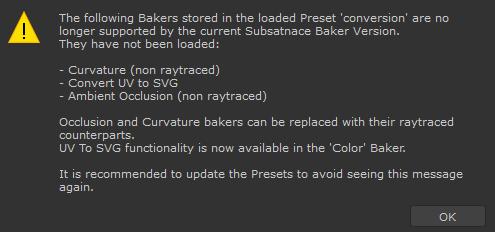
If a preset contained the now deprecated "Ambient Occlusion", "Curvature" or "UV to SVG" Bakers, the Bakers will be skipped during the Preset load and a message will notify you, that they are no longer available


Due to the large rewrite of the Baking System by Adobe, several Bugs are present in early Substance Baker 15.x versions. 
It is recommended to use at least Substance Designer/Automation Toolkit 15.1.3 or higher.


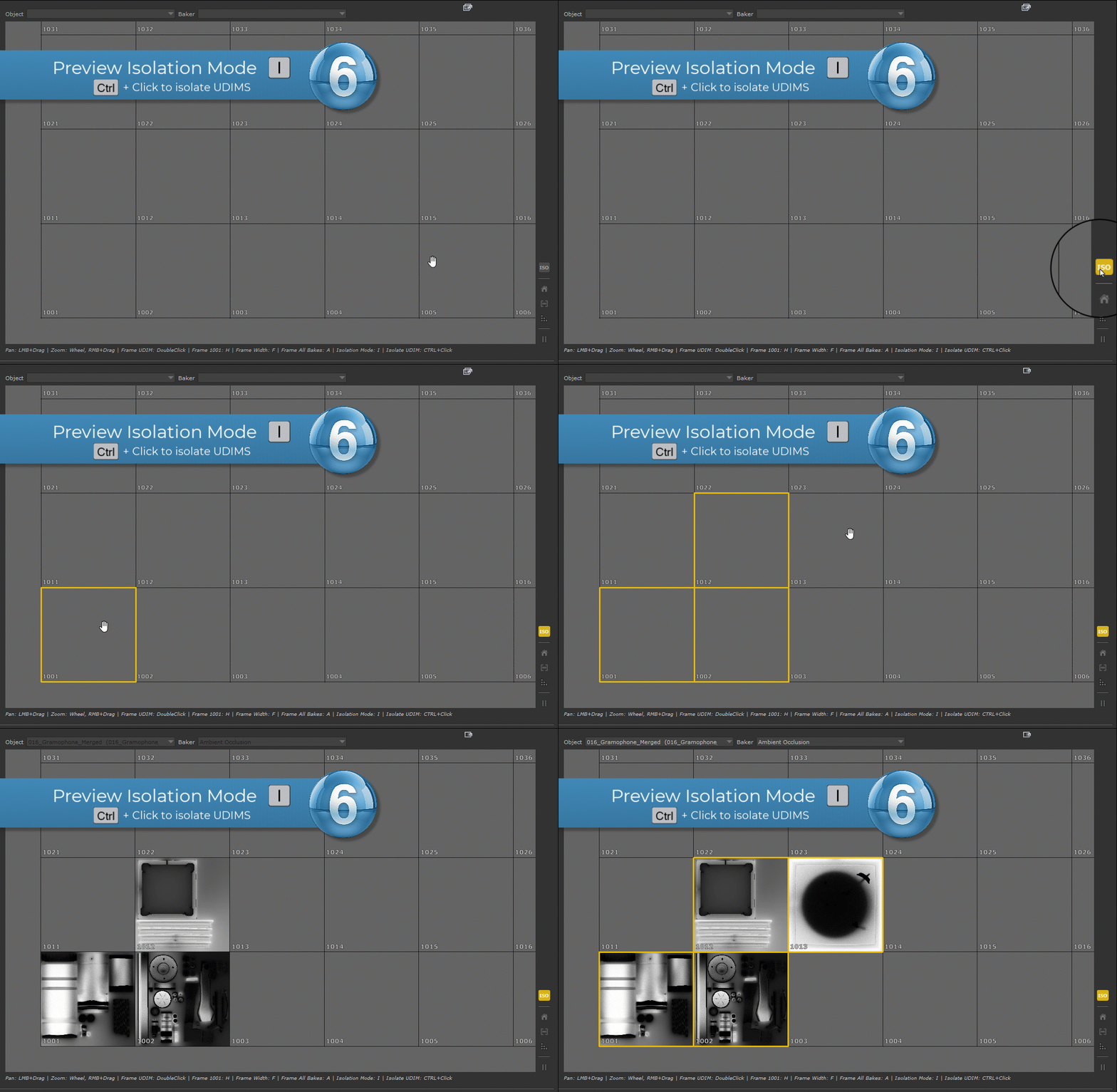
A new "Preview Isolation Mode" has been added to the Substance Baker Bridge. The Isolation Mode allows you to quickly limit the range of Preview renders to certain UDIMs without having to change the UDIM Range on individual Bakers.

To turn on "Isolation Mode" toggle the new ISO Button to the right of the Preview WIndow or press Hotkey I.

CTRL+Click on UDIMs in the Preview Widget to Isolate them. Click again to remove them from the Isolation range

Baking a Preview will then only preview the selected UDIMs. Normal Baking will not be affected by the Isolation Mode.

Turn off Isolation Mode to return to regular Preview Baking using the full UDIM Range set on Bakers


Use the new Preview Isolation Mode to quickly limit the Preview Bake Range to certain UDIMs


Several improvements have been made to navigation in the Preview area:

Double clicking a UDIM now frames it in the Preview area

In addition to left mouse button click & drag to pan the window, you can now also use middle mouse button click & drag

The zoom speed when using right mouse click & drag to zoom in or out has been reduced for more precise zooming


The Baker Bridge window now no longer uses a fixed size and can now be scaled vertically & horizontally, to make use of higher resolution displays. The default size will be set dynamically based on your screen resolution

When "Save Scene after Baking" is turned on, in Mari 7.0 and higher the Baker Bridge now generates a uniquely named Restore Tag in Mari's "Backup & Restore" System


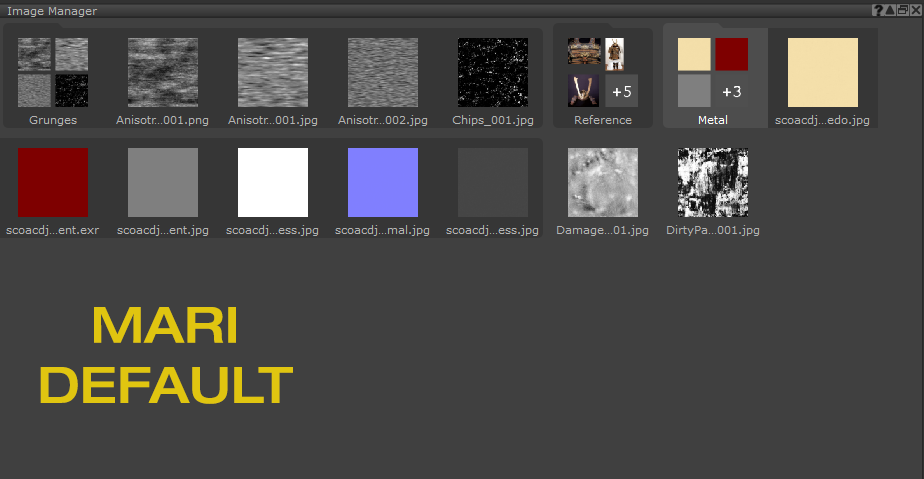
Mari 7.5 introduces the concept of "Image Groups" to the Image Manager. 

The initial design of this feature has drawn community criticism for its lack of clear distinction between groups, group contents and ungrouped images.
Extension Pack now allows you to switch to a more visually clear style:

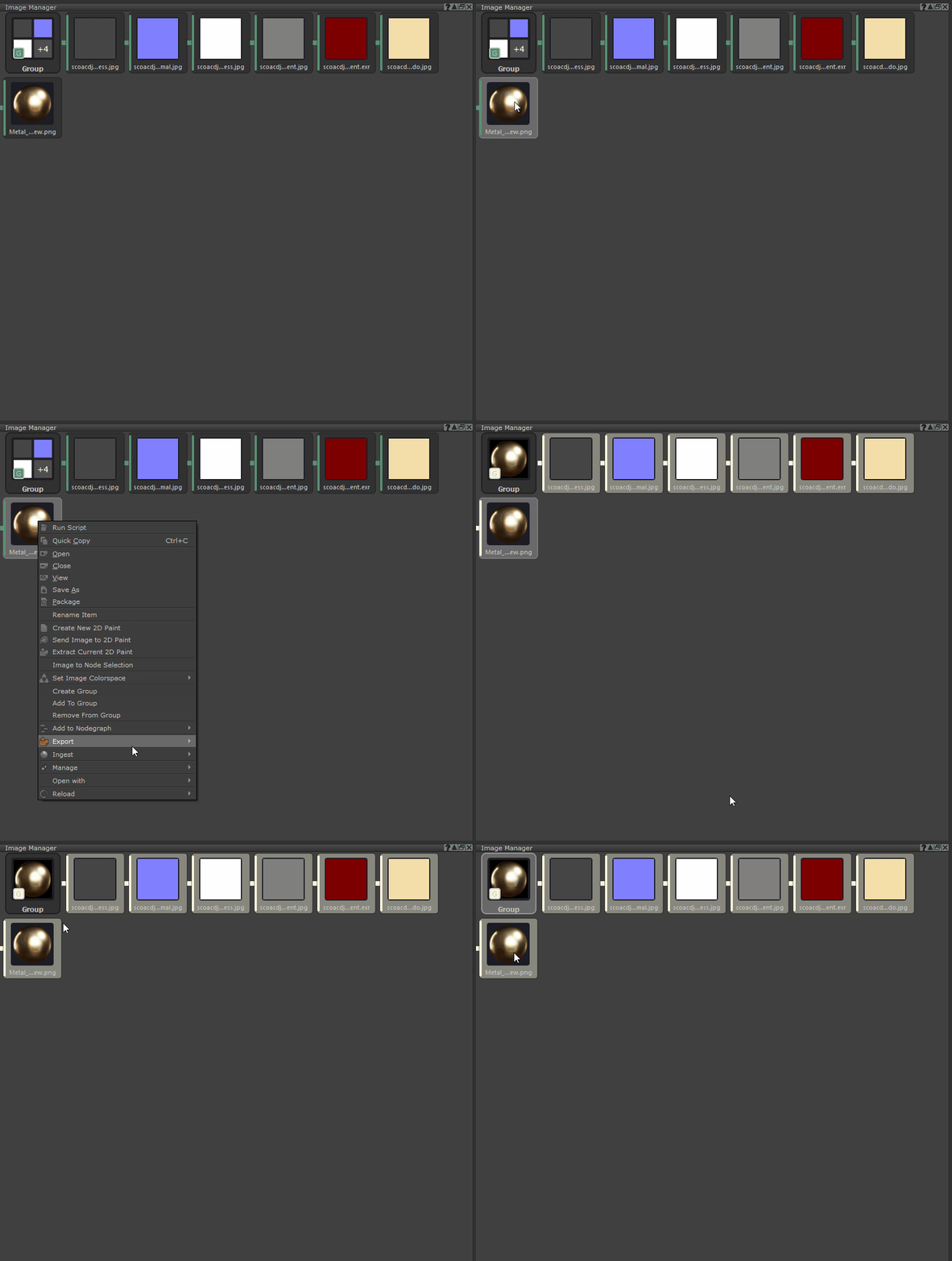
Mari Default Theme vs Extension Pack Theme


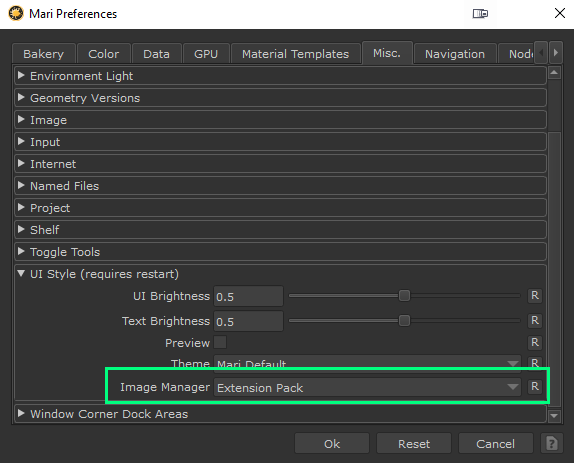
To use an alternative Image Manager skinning, change it via the Mari Preferences / Misc Tab / UI Style section


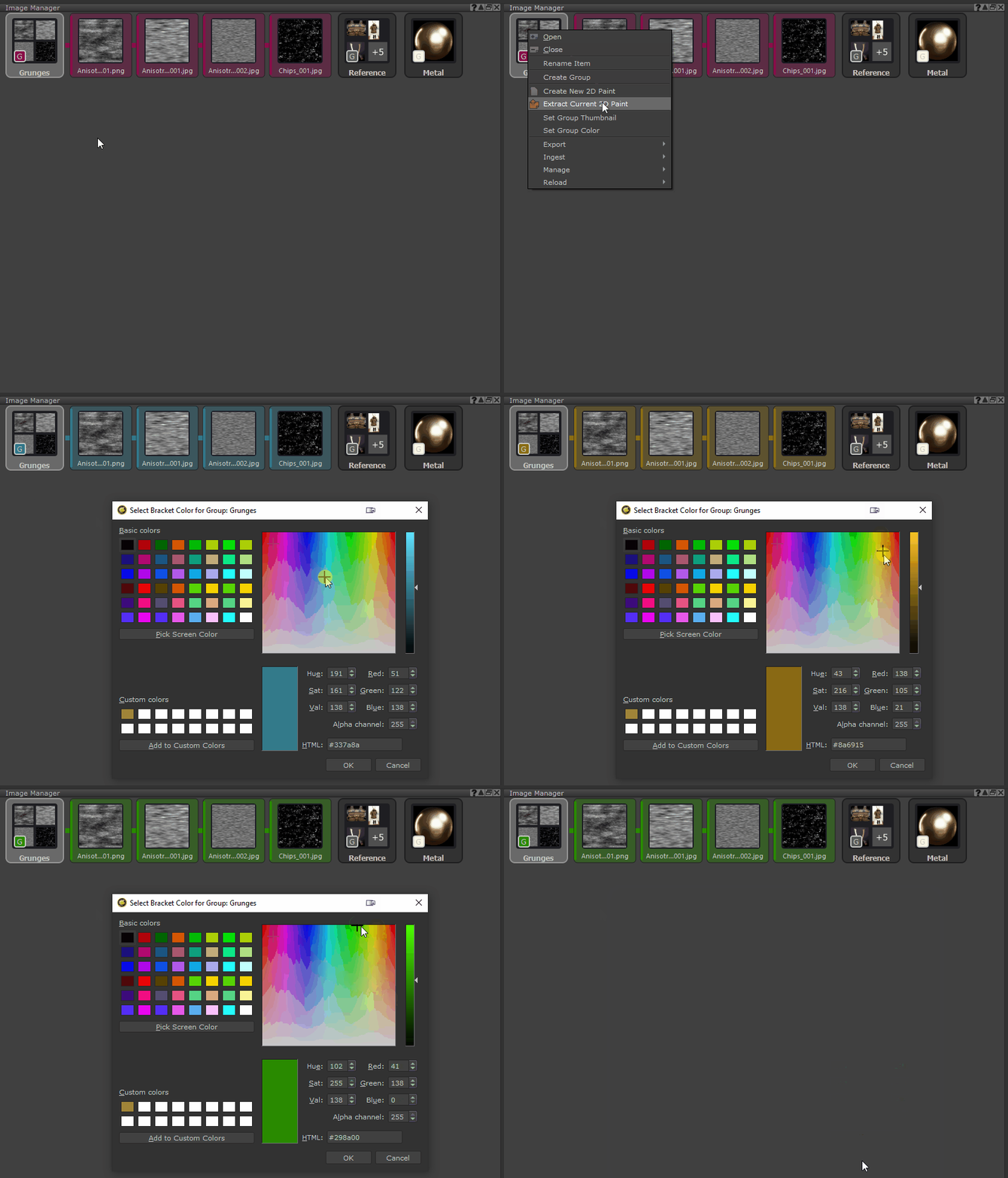
You can set a custom Group Thumbnail as well as modify the Group Color Code via the Right Mouse Click Menu


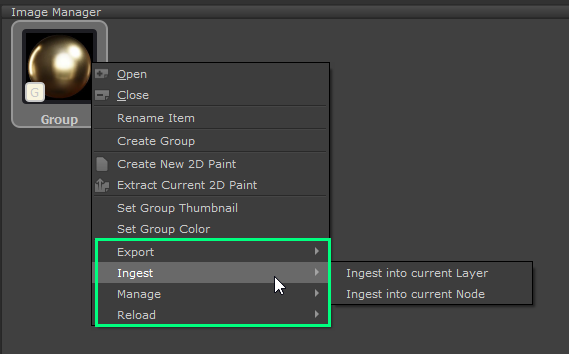
You can set any group Image as a Thumbnail via the Right Mouse Click / Ingest / Set as Group Thumbnail Action


If you drag a folder from a filebrowser into the Image Manager, Mari will auto create an Image Group. If the folder contains a preview or thumbnail image, Extension Pack now will auto set that image as the group thumbnail


Various Extension Pack Features are now available on the right mouse click menu on Image Groups and will run on the contents of the group if launched this way


The "Connect to .. " Dialog when launched from a Radio Node, will now no longer list Radio Transmitter Nodes, that would create a cyclic graph connection (an infinite loop)

In newer Mari Versions (7.5 and higher) the Project Collections Dropdown Menu will auto refresh when an archive is extracted. This is not possible in older Mari Versions.

The In-Viewport Transform Widget now allows selective resetting of values to their defaults:

CTRL + Middle Click on a value field will reset the field to its default value

ALT + Middle Click on a value field will reset the entire row of values (e.g. all translations, all rotations or all scales)


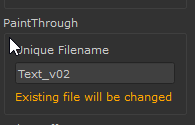
The Text Generator on launch will now auto-increment the default Paint Through Filename, if an existing Image Manager Text File with the same name is already in use in the project

The Text Generator will now give a visual hint that an existing text may be changed in an loaded Image Manager file, if a paint through image file name is given that already exists in the project


BUGFIXES


The "Image is Reference" option on Image Manager Images was no longer evaluated when using "Remove unused Images", resulting in images being removed that the user intended to be excluded

Fixed an issue that could prevent Extension Pack from loading, when on startup it was trying to remove an empty but locked shelf

Fixed a python error when using "Replace Merge Nodes with Blend Mode Nodes", if the original Menu Nodepath could not be detected

Fixed an issue where when the active Nodegraph QT Widget could not be found through recursive UI searches, the alternate search method did not activate

Fixed an issue where navigating the project view with the arrow keys could repeatedly print a "No Project currently Open" error message in the Python window

Using the "Connect to.." action on  Broadcaster Nodes (to set a channel name) no longer opened the "Broadcast Channel Name" Dialog

Hotboxes set to "Press and Hold" Hotkey behavior, did not auto close if the assigned hotkey contained a modifier key (e.g. SHIFT+C)

The "Assign Shortcut" Dialog when launched from the "Hotkey Conflict Resolve Dialog" would open up behind its parent window

Having shelves from Extension Pack 5 or earlier versions in the shelf palette could cause name clashes with Extension Pack 6 shelves

"Export only modified UDIMs" in the Export Channel Tool was sometimes not detecting option or connection changes on Bake Points

Scaling the "Preset Browser" Window horizontally was extremely slow

The Viewport Transform Widget allowed for entering negative scale values for Geometry Deformations, which is not supported by Mari's native Viewport Transform Gizmo

The "Reload Images" option in the Image Manager would not correctly reassign images to nodes, if the same image was loaded into the image manager multiple times with different colorspaces

Several fixes have been made to the Substance Baker Bridge

The "Verbose Baking" Option if turned on  (providing more information about the baking process) could cause a Mari Crash, if the Bakes were very fast and were flooding the Log View with Messages at high frequency

Turning off the "Default Average Normals" checkbox in the Baker Defaults section did not have any effect on newly created bakers

The "Frame all Bakes" option in the Preview Area was no longer correctly framing all bake images

Using Right Mouse Click Drag to zoom in the Preview Area caused the zoom center to drift

Baker specific settings, that would only display when a certain setting was checked, would not correctly display when a Preset was loaded initially

The Ambient Occlusion "Ground Plane" Slider was locked to a range of 0 to 100.

Some Preview Bakes would not be loaded into the Preview Area when the "Verbose Baking" option was turned on, due to the load signal getting drowned out by by high frequency log messages


API Updates

New Python functions have been added to control Image Manager Image Groups

mari.ep.imageManager.selectedImageGroup()

mari.ep.imageManager.removeEmptyImageManagerGroups()

mari.ExtensionPack.imageManager.setGroupColor(group_name: str, color: str)

mari.ExtensionPack.imageManager.setGroupColorFromIcon(group_name: str, icon_path: str)

mari.ExtensionPack.imageManager.setGroupIcon(group_name: str, icon_path: str, color_code: str)

mari.ExtensionPack.imageManager.setGroupIconFromImageSelection()


Python Stubs are now available for Mari 6.0v3 and Mari 7.5v2. These also include the Extension Pack classes mari.ExtensionPack() and the alias mari.ep()
You can find the stubs under the Install Folder /Tools/PythonStubs.

Class Enums can now be displayed in the Class/Method Finder and general Search performance has been improved dramatically


Deployment Updates


Please note, Extension Pack 6 will be the last version to be tested on Linux CentOS. Going forward all Linux testing will happen on Rocky Linux 9 exclusively.


Mari Extension Pack 6 R4 will be the last version adhering to VFX Ref Platform 2023. Future Versions will exclusively run in Mari Versions supporting PySide6 (Mari 8 and higher)


The downloadable Offline Help has been updated. You can download it from here.